Sell by scanning product QR
Scan a Kroply product QR with a camera or supported USB scanner to add it to the bill. Review quantity and price before saving.
Explore workflowKroply helps fertilizer dealers, Krishi Seva Kendras and agricultural input shops manage billing, stock, supplier invoices and customer credit. Connected records help you review daily transactions.
Current trial details are shown before signup
See how Kroply connects every department of your agri-retail store into one intelligent system.
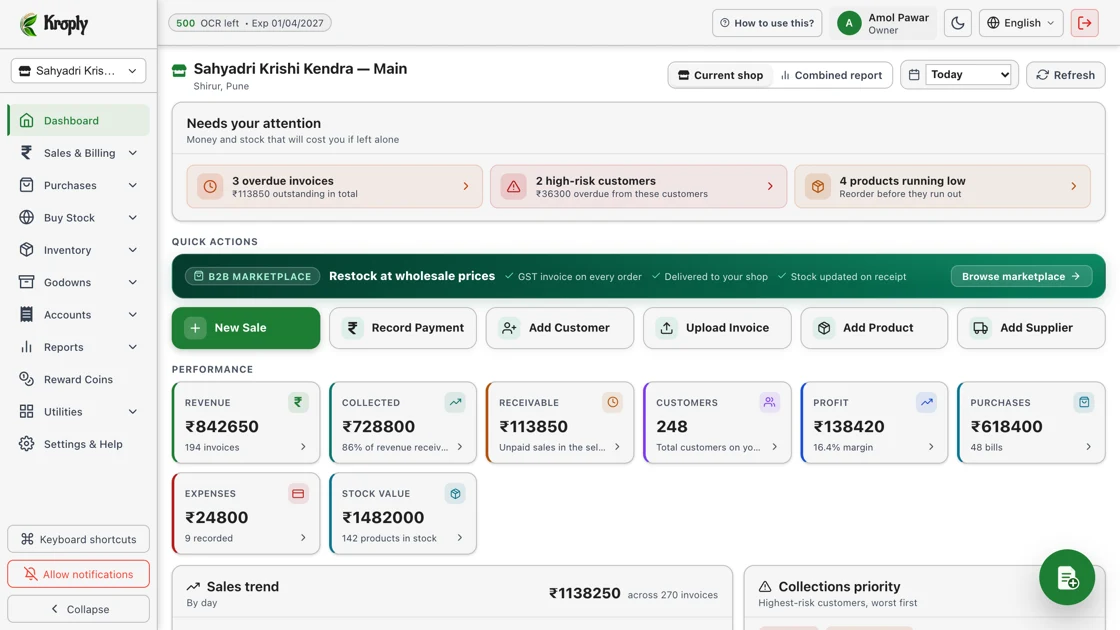
Review revenue, collected cash, pending customer credit, overdue invoices, and branch stock value in one owner dashboard.
Manage counter billing, multi-godown stock, farmer credit and GST invoice records in one platform.
Create GST and retail invoices, review the print preview and choose whether to share an invoice through WhatsApp. Check your printer and barcode setup during a demo.
Choose a workflow. See what it does. Open the guide.
Scan a Kroply product QR with a camera or supported USB scanner to add it to the bill. Review quantity and price before saving.
Explore workflowCreate GST and retail invoices, review the print preview and choose whether to share an invoice through WhatsApp. Check your printer and barcode setup during a demo.
Explore workflowEasily sell partial quantities (kg, grams, liters) from bulk fertilizer bags or chemical drums.
Explore workflowPrepare an invoice link or balance message, check the customer and amount, then choose whether to share it through WhatsApp.
Explore workflowFollow customer quotations, order status and delivery through to invoice creation.
Explore workflowTrack bag counts for Urea, DAP, NPK and crop chemicals with batch deduction, expiry alerts, and physical stock reconciliation.
Explore workflowReal-time stock visibility across main shop counter and multiple remote godowns with internal transfer challans.
Explore workflowUpload a supplier invoice image or PDF. Review and correct the extracted purchase draft before saving it to update stock.
Explore workflowTrack supplier purchases, outstanding balances, payment history, and returns in one place.
Explore workflowCount stock, compare it with recorded quantities and review differences before finalizing the audit.
Explore workflowRecord customer or supplier returns and review the related stock and account adjustments.
Explore workflowMaintain a digital credit ledger and open a reviewed WhatsApp balance reminder when follow-up is needed.
Explore workflowRecord cash, UPI, bank transfer, and credit sales in a single transaction.
Explore workflowTrack cash, bank, UPI balances, account transfers, opening balances, and daily business expenses.
Explore workflowLog daily business expenses by category, track spending patterns, and view comprehensive profit reports.
Explore workflowTrack daily gross margins, top-selling fertilizers, cash vs credit ratios, and high-demand seasonal trends.
Explore workflowDiscover demand, identify slow movers and review stock for your selected shop.
Explore workflowGenerate GST-related sales, purchase and tax summaries using your configured product and invoice data. Review reports with your accountant or tax professional before filing or statutory submission. Invoice generation does not file a GST return.
Explore workflowReview consultant referrals and crop plans, then prepare the customer invoice.
Explore workflowRecord shift-based visits and review location evidence, exceptions and reports.
Explore workflowReward customers with coins on eligible purchases. Customers can redeem available coins as a discount on future bills. Manage reward rules and share available balances and expiry details.
Explore workflowMaintain contact details, purchase history, outstanding credit, and payment patterns.
Explore workflowTrack deliveries. Stock is added to your shop automatically when you confirm delivery.
Explore workflowLocal forecasts, practical farming guidance and trusted agriculture updates in one simple view.
Explore workflowControl staff access with assigned roles and permissions, and review available activity records.
Explore workflowEvery plan includes mobile app and web app access, with the same records everywhere and cloud backup.
Explore workflowKroply offers English, Hindi, Marathi, Bengali, Telugu, Tamil, Gujarati, Kannada, Odia and Malayalam interfaces. Customer support language availability should be confirmed when booking a demo.
Explore workflowMove from your existing software to Kroply with free assisted import of products, customers, suppliers, and opening balances.
Explore workflowGet started in minutes — no technical knowledge required.
Create your account, add your shop details, and set up your preferences.
Upload supplier invoices with OCR or add products manually.
Kroply creates GST-ready invoices using configured product HSN and tax details. Review classifications and rates with your accountant; an invoice or report is not a filed return.
Summaries of customer feedback shared with the Kroply team.
Easy to use for everyday billing. Preparing bills takes less time, which makes daily shop work simpler.
Kundai Agro Agency
Supplier invoice OCR saves time on stock entry. Uploading the bill, checking the extracted items and saving the purchase makes adding stock easier.
Viraj Agro
Trusted technology designed specifically for fertilizer, pesticide, and seed businesses.
Access your shop records online using an authorized account and an internet connection.
Switch counter and app screens across 10 Indian languages; confirm support language availability when booking a demo.
Start using Kroply today with zero payment details.
Your current plan shows the features and updates included with your subscription.
Select the perfect plan for your business needs
Experience Pro features for 7 days
Web and mobile starter plan
For growing businesses
For teams and advanced users
Tell us how many shops and users you need and we will price it for you.
All plans include secure data storage and email support
Simple, searchable guides for every Kroply workflow in English, Hindi and Marathi.
Join agri-retailers using Kroply for daily operations. Start the currently available free trial today.
Kroply helps fertilizer dealers, Krushi Seva Kendras, Krishi Seva Kendras and agricultural input shops manage billing, stock, supplier invoices and customer credit. Connected records help you review daily transactions. Kroply offers English, Hindi, Marathi, Bengali, Telugu, Tamil, Gujarati, Kannada, Odia and Malayalam interfaces. Customer support language availability should be confirmed when booking a demo.
Explore billing, stock and customer credit in ten languages.
English · हिंदी · मराठी · বাংলা · తెలుగు · தமிழ் · ગુજરાતી · ಕನ್ನಡ · ଓଡ଼ିଆ · മലയാളം
Fertilizer shops, Krushi Seva Kendras, Krishi Seva Kendras, seed stores and pesticide dealers manage GST-ready billing, batch and expiry stock, multi-godown transfers, supplier purchases and farmer credit (udhari) in one cloud system.
Fertilizer shop software · Fertilizer shop management software · Fertilizer shop management system · Best fertilizer shop software in India · Fertilizer billing software · Fertilizer inventory software · Krushi Seva Kendra & Krishi Seva Kendra software · Krishi Seva Kendra billing software
Manage Urea, DAP, NPK bags, pesticide bottles and seed lots with separate units, bag-to-loose splitting, technical chemical composition search and near-expiry reports.
Pesticide shop billing software · Seed shop & khad beej billing software · Agro dealer software · Fertilizer stock register workflows
Upload photos or PDFs of distributor bills. Kroply parses line items, batches, expiry dates, HSN codes and taxes into an editable draft that staff review before saving to stock.
Supplier invoice OCR · AI fertilizer billing software · Supplier management
Record cash, UPI and credit sales with thermal or A4 printing, track farmer udhari balances with WhatsApp reminders, and export GSTR-1/GSTR-3B summaries for accountant review.
Farmer credit management · Agriculture POS billing · Barcode billing setup · GST billing for agro shops · Financial & sales reports
Run Kroply in a web browser on PC or laptop and on Android mobile via Google Play (iOS coming soon). Core workflows require an internet connection. Compare plans and start the free trial with no card required.
View Kroply pricing · Free trial and demo · Mobile billing app · About Kroply · All Kroply features · How Kroply works · FAQ
Connect agri-consultancy referrals, shift-based salesperson visit tracking, quotations, delivery tracking, staff permissions and customer reward coins.
Agri consultancy software · Salesperson tracking software · Quotations and delivery · Customer accounts and reward coins · Shop expense management · How to use Kroply · Indian-language guides · Fertilizer shop software buying guide
Summaries of customer feedback shared with the Kroply team.
Kundai Agro Agency
Easy to use for everyday billing. Preparing bills takes less time, which makes daily shop work simpler.
Viraj Agro
Supplier invoice OCR saves time on stock entry. Uploading the bill, checking the extracted items and saving the purchase makes adding stock easier.
Sudhan Agro Services
The reports are clear and easy to understand. Checking the details is straightforward, without having to work through complicated screens.
Check the current price, trial duration and included allowances on the Pricing page and during signup.
Yes. Kroply brings inventory, GST-ready billing, customer dues, supplier records, expenses, and reports into one place.
Upload a supplier invoice photo or PDF. Kroply extracts information into a draft; review and correct every line before saving the purchase to update stock.
Kroply offers English, Hindi, Marathi, Bengali, Telugu, Tamil, Gujarati, Kannada, Odia and Malayalam interfaces. Customer support language availability should be confirmed when booking a demo.
You can book a free demo or reach out via the Contact Us page. Our team will help you get started, choose a plan, and set up your account.
Every plan includes both mobile app and web app access. Access depends on account permissions.
Kroply creates GST-ready invoices using configured product HSN and tax details. Review classifications and rates with your accountant; an invoice or report is not a filed return.
Core workflows require an internet connection to keep shared records in sync.
We accept all major UPI apps, debit and credit cards, and net banking through our secure Razorpay payment gateway.
Staff use individual accounts with assigned permissions. User allowances depend on the plan; session limits follow the account’s configured access rules.
Yes. Kroply includes a complete supplier ledger — record purchases, track outstanding dues, log payments, and view full transaction history for each supplier.
Kroply generates sales reports, purchase reports, customer ledgers, supplier ledgers, GST summaries, expense reports, profit and loss statements, and stock audit reports.
Prepare an invoice link or balance message, check the customer and amount, then choose whether to share it through WhatsApp.
Recorded purchases and sales update stock. Review returns, adjustments and godown transfers, and compare recorded quantities with physical stock.
Yes. Kroply is agriculture shop management software for fertilizer, pesticide and seed retailers, including Krushi Seva Kendras (KSK) and agro agencies. Manage product records, supplier purchases, billing and farmer udhari together.
It connects billing, purchases, stock, customer dues, supplier accounts and reports. Kroply brings these daily fertilizer-shop tasks into one place.
It records the products, quantities, prices, discounts, configured taxes and payment details on a sale. Saving a sale in Kroply also updates stock and customer balances.
Record a sale against the customer, enter the payment received and review the remaining balance in their ledger. Record later payments against the same customer to keep outstanding amounts accurate.
Use Accounts and Expenses to record business costs with the date, category, amount and payment details. Review expense reports alongside sales and purchases.
Check the Pricing page and the plan shown during signup for current prices, validity and usage limits. Choose a plan based on your shops, users and OCR needs.
The trial registration flow uses your account and business details and OTP verification. Paid subscription checkout is a separate step. Review the current trial terms during signup.
Compare daily workflows: create a bill, enter a supplier purchase, check batch stock and record a farmer payment. Review language support, internet requirements, pricing and plan limits. Kroply connects these tasks for fertilizer dealers in India.
Use stock locations to track where goods are stored. Record transfers with the source, destination and quantity, then compare location balances with physical stock.
Users with permission can add and manage shops within your plan limit. Check which shop is selected before making entries or viewing reports.
Fertilizer shops, Krishi Seva Kendras, agro-dealers and agricultural input retailers can use Kroply. Distributors can review the supported purchase, sales, stock and account workflows against their requirements before choosing a plan.
Kroply helps fertilizer dealers, Krishi Seva Kendras and agricultural input shops manage billing, stock, supplier invoices and customer credit. Connected records help you review daily transactions. Kroply offers English, Hindi, Marathi, Bengali, Telugu, Tamil, Gujarati, Kannada, Odia and Malayalam interfaces. Customer support language availability should be confirmed when booking a demo.
Migration depends on the source records and supported administrative CSV templates. Contact Kroply to confirm scope; reconcile opening stock and balances before using the imported records. A universal importer is not promised.
Kroply offers English, Hindi, Marathi, Bengali, Telugu, Tamil, Gujarati, Kannada, Odia and Malayalam interfaces. Customer support language availability should be confirmed when booking a demo.
Kroply offers English, Hindi, Marathi, Bengali, Telugu, Tamil, Gujarati, Kannada, Odia and Malayalam interfaces. Customer support language availability should be confirmed when booking a demo.
